
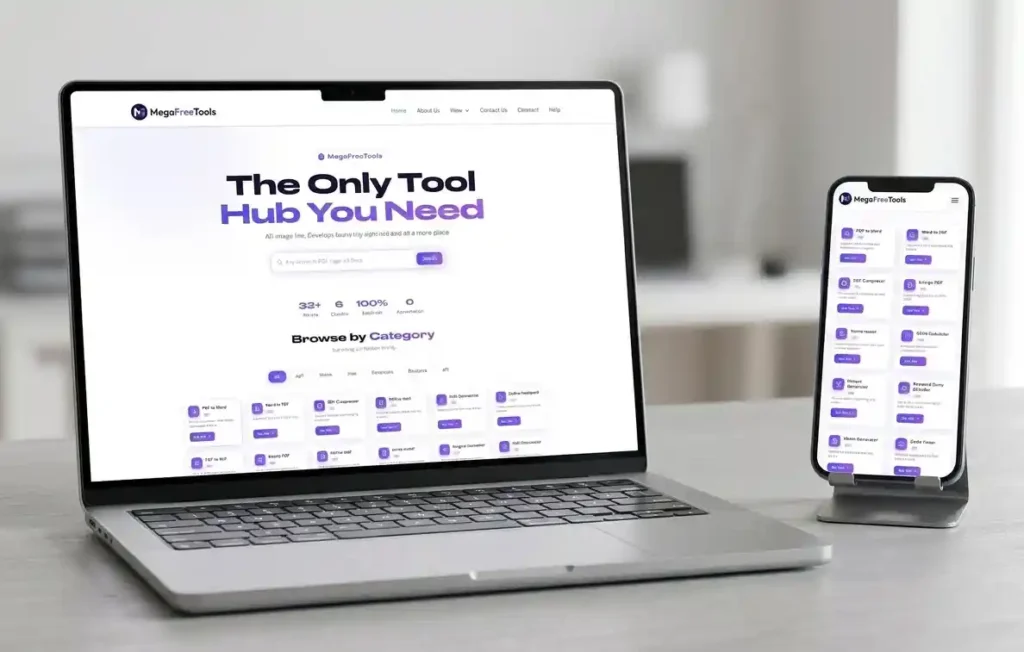
The Only Tool
Hub You Need
PDF, Image, Text, Developer & Security tools — all free, all instant, all in one place.
Browse by Category
Pick a category to filter tools instantly
All Free Tools
Click any tool to get started instantly — no sign-up needed
Why Choose MegaFreeTools?
Built for speed, privacy and simplicity
Lightning Fast
All tools run directly in your browser — no uploads, no waiting. Instant results every time.
100% Secure
Your files never leave your device. All processing happens locally in your browser.
Always Free
No hidden fees, no premium tiers, no credit card required. Free forever, period.
Mobile Friendly
Every tool works perfectly on all screen sizes — phone, tablet or desktop.
What is Mega Free Tools?
Mega Free Tools is a powerful, all-in-one online productivity platform that gives you instant access to 30+ free professional tools — covering PDF conversion, image editing, text utilities, developer tools, QR code generation, and security tools. Whether you are a student, developer, designer, or business professional, Mega Free Tools has everything you need to get your work done — fast, free, and without any sign-up.
No downloads. No installations. No registration. Just open your browser, pick a tool, and start working in seconds.
Our platform is built around one simple idea: essential online tools should be free and accessible to everyone. From converting a PDF to Word to compressing an image, generating a QR code, or validating JSON data — everything is available with one click, completely free, forever.
We also recommend checking out Toolify Worlds for additional productivity tools and helpful blogs to boost your workflow.
Why Choose Mega Free Tools?
There are hundreds of tool websites out there — so why should you choose Mega Free Tools? Because we built this platform with you in mind. Here is why millions of users worldwide trust us every day:
✅ 100% Free — Forever Every single tool on Mega Free Tools is completely free. No subscriptions, no hidden charges, no premium plans. You get full access to professional-grade tools without spending a single rupee or dollar.
✅ No Sign-Up Required Unlike most platforms that force you to create an account, we believe your time is valuable. Visit megafreetools.com, pick any tool — like our Password Generator or Word Counter — and start using it instantly.
✅ Privacy First — Your Data Stays Safe All file processing happens directly in your browser. Your files and data are never uploaded to any server. Whether you are working with confidential PDFs or private images, your information stays 100% private.
✅ Lightning Fast Results Most tools deliver results in under 10 seconds. Our PDF Compressor, Image Compressor, and JPG to PNG converter are optimized for speed so you can get back to what matters most.
✅ Works on All Devices Whether you are on a mobile phone, tablet, or desktop, every tool is fully responsive and works perfectly on any screen size.
✅ Clean, Distraction-Free Interface No annoying pop-ups, no spam ads. Just a clean, simple interface that lets you focus on your task and get results quickly.
For even more tools and productivity tips, you can also explore Toolify Worlds — a trusted external resource for online tool users.
Key Features That Set Us Apart
We are not just another tool website. Here is what makes Mega Free Tools truly different:
⚡ Instant Access — No Waiting Every tool loads instantly in your browser. Try our Online Notepad or Color Picker and see for yourself.
📁 Wide Format Support We support all major file formats — PDF, DOCX, JPG, PNG, JSON, and more. Convert JPG to PDF, PNG to PDF, Word to PDF, PDF to JPG, and PNG to JPG — all in one place.
🔒 Secure Processing Sensitive data like passwords and private documents never leave your device. Our Password Generator and Watermark Remover process everything locally.
📱 Mobile-Friendly Design Every single tool — from Image Resizer to QR Code Generator — is fully optimized for mobile use.
🔄 Regular Updates Our tools are constantly updated based on user feedback. We regularly add new tools and improve existing ones across all tool categories.
🗂️ Organized by Category Browse tools by category: PDF Tools, Image Tools, Text Tools, Developer Tools, Security Tools, and QR Tools. Visit our Tools page to explore them all.
🎨 Batch & Advanced Processing Need to merge multiple PDFs? Use our Merge PDF tool. Need to split a large document? Try our Split PDF tool. Need to change text case? Our Case Converter handles it in one click.
🌐 No Hidden Costs — Ever Unlike other platforms that lock features behind paywalls, everything on Mega Free Tools is free. Visit our Services page to see everything we offer.
Pro Tips for Best Results
For PDF Conversions: When converting PDF to Word, ensure your original PDF has selectable text rather than just scanned images for best results. If you’re working with scanned documents, our OCR technology will extract text, though formatting may require minor adjustments.
For File Compression: Balance file size and quality based on your needs. For web uploads, aggressive compression works well. For printing or professional documents, use moderate compression to preserve clarity.
For Background Removal: Use high-contrast images where the subject clearly differs from the background. Photos with blurred backgrounds or complex edges work better than busy, detailed backgrounds.
For Merging PDFs: Organize your files before uploading by renaming them in the order you want. This saves time when arranging pages in the merger tool.
About Mega Free Tools
Mega Free Tools was created with one clear mission: to make professional-grade online tools accessible to everyone — for free.
We noticed that most productivity tools online were either hidden behind expensive subscriptions, required unnecessary account creation, or were filled with intrusive advertisements. We built Mega Free Tools to change that.
Today, Mega Free Tools offers 30+ carefully built tools across 6 major categories — PDF, Image, Text, Developer, Security, and QR tools. From simple everyday tasks like converting a Word file to PDF or removing a background from an image to more advanced needs like JSON validation and text-to-PDF conversion — our platform covers it all.
We believe that powerful tools should not be a privilege for those who can afford expensive software. Whether you are a student in a small town, a freelancer on a tight budget, or a professional looking for a quick solution — Mega Free Tools is built for you.
Our team is committed to:
- Keeping all tools 100% free, forever
- Protecting your privacy and never storing your data
- Delivering fast, accurate, and reliable results
- Continuously adding new tools based on what users actually need
Have a question or suggestion? We would love to hear from you. Visit our Contact Us page or read more on our About Us page.
We also recommend exploring Toolify Worlds — a great external resource for discovering more online productivity tools and reading helpful tutorials.
Start using tools now — free, instant, and no registration required. 👉 Explore All Tools
Frequently Asked Questions
Is Mega Free Tools really free?
Yes, absolutely. Every tool on Mega Free Tools is 100% free. There are no subscriptions, no premium tiers, and no hidden charges. All tools are free forever.
Do I need to create an account to use the tools?
No. You do not need to register, sign up, or provide any personal information. Just visit the website and start using any tool instantly — whether it is our PDF Compressor or Image Resizer.
Is my data safe when I use Mega Free Tools?
Yes. All file processing happens directly in your browser. Your files are never uploaded to any external server, so your data stays completely private and secure.
Which file formats does Mega Free Tools support?
We support all major formats including PDF, DOCX, JPG, PNG, JSON, and plain text. You can convert JPG to PDF, PDF to Word, PNG to JPG, PDF to JPG, and many more.
Can I use Mega Free Tools on my mobile phone?
Yes. All tools are fully mobile-responsive and work perfectly on smartphones, tablets, and desktops. Try our QR Code Generator or Word Counter on your phone right now.
How many tools does Mega Free Tools offer?
Currently, Mega Free Tools offers 30+ tools across 6 categories — PDF, Image, Text, Developer, Security, and QR Tools. We keep adding new tools regularly. Visit our Tools page to see the full list.
What are the most popular tools on Mega Free Tools?
Some of the most used tools include:
Can I suggest a new tool to be added?
Absolutely. We love user feedback. Visit our Contact Us page and share your suggestions. We regularly add new tools based on what our users need.
Are there any ads on Mega Free Tools?
We keep our interface as clean and distraction-free as possible. Our focus is on giving you the best tool experience without unnecessary interruptions.
Where can I find more online productivity tools?
Besides Mega Free Tools, you can also check out Toolify Worlds — an excellent external resource with additional tools and productivity guides.